Today Apple development representative called and offered me to acquire fgBrowsers unique One Finger Gestures to implement them into Safari for iOS5!
Thanks and keep fgBrowsing everybody =)
Matthias
Showing posts with label fgBrowser. Show all posts
Showing posts with label fgBrowser. Show all posts
Friday, April 1, 2011

Friday, December 17, 2010
Mobile websites issue!
The update introduced a misbehavior with some mobile sites... Sites like macrumors use some sort of forwarding to their mobile forum.. fgbrowser misintreprets those links as AppStore candidates and forwards the link to iOS, however it's of course only meaningfull regarding an AppStore app link. ( to bring up the AppStore )
I've already submitted a fix to Apple hope it's getting approved soon!
Seems like the version 4.2 has always some sort of shortcoming... iOS also hat a very short life on 4.2 and skipped somehow immediately to 4.2.1...
Again I'm sorry for any inconvenience caused!
I've already submitted a fix to Apple hope it's getting approved soon!
Seems like the version 4.2 has always some sort of shortcoming... iOS also hat a very short life on 4.2 and skipped somehow immediately to 4.2.1...
Again I'm sorry for any inconvenience caused!
Thanks @ JN Gold for pointing this one out! (see for reference)
Monday, December 13, 2010
Big X-MAS Update!
Happy X-Mas trusty fgBrowsers!
Multitouch fgBrowser made a big leap forward, introducing:
* configurable @ general settings! Needs full app restart (I.e. multitasking close of app)
** set language @ general settings!

Don't wait get it now!
Merry X-Mas everyone!
Multitouch fgBrowser made a big leap forward, introducing:
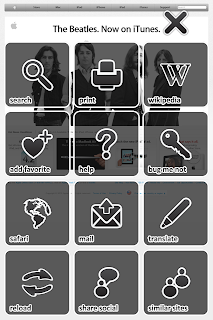
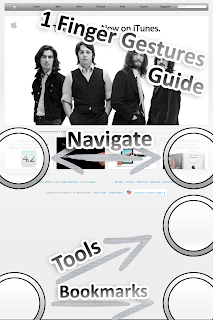
- one hand operation featuring one finger gestures
- social network integration (Facebook,Twitter, Tumblr, Delicious, Google Reader, Instapaper, Read It Later, Pinboard)
- Bug me not integration
- Wikipedia integration
- Search in Site
- Translate Site**
- Find similar Sites
- Gesture Helper to train gestures
- Print Page
- Change User Agent! Pretend to be an Internet Explorer, or fake an Android or Nokia Mobile! *
* configurable @ general settings! Needs full app restart (I.e. multitasking close of app)
** set language @ general settings!


Don't wait get it now!
Merry X-Mas everyone!
Thursday, November 25, 2010
Saturday, November 20, 2010
New Stuff
Hey there trusty fgBrowsers!!!
There are some cool new features in the work, which will be available shortly after the release of iOS 4.2.1! However I'm still thinking and tweaking the iPad version of fgBrowser.
More breaking news will follow!
Take care,
Matthias!
There are some cool new features in the work, which will be available shortly after the release of iOS 4.2.1! However I'm still thinking and tweaking the iPad version of fgBrowser.
More breaking news will follow!
Take care,
Matthias!
Wednesday, July 7, 2010
3 Tap Gesture
Hey there,
just read a comment @ US iTunes Store:
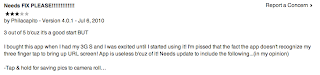
I'm sorry I can't reproduce this issue. You don't have to put all 3 fingers at the very same time down the screen. It's quite sufficient to put them one after another.
Please report me if the issue persist, or more people are affected.
Thank you!
just read a comment @ US iTunes Store:

I'm sorry I can't reproduce this issue. You don't have to put all 3 fingers at the very same time down the screen. It's quite sufficient to put them one after another.
Please report me if the issue persist, or more people are affected.
Thank you!
Tuesday, July 6, 2010
Update!!!
Hey there trusty fgBrowsers!!! I'm happy to announce, the private version of Multitouch is now a universal app for the iPhone and iPad!
Also coming with "High Res" Artwork for the iPhone4!!!!
The normal version is also updated with "High Res" and now available on the AppStore.
The visibility of the loading indicator is know improved (due a bug of the iPhone 4)
cya soon!
Also coming with "High Res" Artwork for the iPhone4!!!!
The normal version is also updated with "High Res" and now available on the AppStore.
The visibility of the loading indicator is know improved (due a bug of the iPhone 4)
cya soon!
Tuesday, June 29, 2010
iPad Issue; iPhone 4 Issue
I'm sorry to announce...
There are two big issues with the current selling fgBrowser versions.
First fgBrowser Private for the iPad... It crashes immediately. I submitted a new iPad release for Approval, please bare with me.
Second, any fgBrowser version for the new iPhone 4. The status indicator seems there to uses another implementation. See here [stackoverflow] for more details.
I've done a quick workaround to fix the usability, but in respect to look and feel, I'm not happy with my solution. I hope Apple will fix the UIActivityIndicatorView in there "Signaling update".
So again "stay tuned"...
There are two big issues with the current selling fgBrowser versions.
First fgBrowser Private for the iPad... It crashes immediately. I submitted a new iPad release for Approval, please bare with me.
Second, any fgBrowser version for the new iPhone 4. The status indicator seems there to uses another implementation. See here [stackoverflow] for more details.
I've done a quick workaround to fix the usability, but in respect to look and feel, I'm not happy with my solution. I hope Apple will fix the UIActivityIndicatorView in there "Signaling update".
So again "stay tuned"...
Monday, June 21, 2010
iOS4 Release
Thursday, May 13, 2010
User interface - 3 finger down
Hey every new fgBrowser,
to access the favs and history, lay down 3 fingertips onto the screen...
Other gestures:
2 fingers parallel....
... bottom to top: lock or unlock screen autorotation (accelerometer)
... top to bottom: access a website based subcontent menu
- email this page (with preview image attached)
- add / remove to / from favs
- open in safari
- reload
... left to right or vice versa: navigate through current history (ie like clicking on the back and forth button in safari)
To save an image to the camera roll, just align the picture so it's fits your screen and press the "sleep/wake" and "home" button of your iPhone simultaneously. You will see a short flash and it will be saved in your camera roll...
Best greets,
Matthias
to access the favs and history, lay down 3 fingertips onto the screen...
Other gestures:
2 fingers parallel....
... bottom to top: lock or unlock screen autorotation (accelerometer)
... top to bottom: access a website based subcontent menu
- email this page (with preview image attached)
- add / remove to / from favs
- open in safari
- reload
... left to right or vice versa: navigate through current history (ie like clicking on the back and forth button in safari)
To save an image to the camera roll, just align the picture so it's fits your screen and press the "sleep/wake" and "home" button of your iPhone simultaneously. You will see a short flash and it will be saved in your camera roll...
Best greets,
Matthias
Friday, May 7, 2010
send link as email with preview image
Hey there trusty fgBrowsers,
there is a slight issue with the email text. To fix it please go to your general iPhone "Settings" scroll down to "Multitouch" and open once all the hidden settings for your fgBrowser. (Hit the Multitouch with the lock symbol for the private one) There are some handy settings ready to be set:
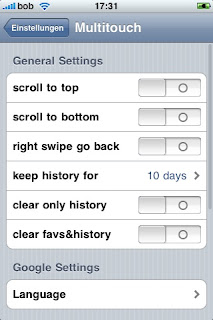
- scroll to top: if enabled touch the top of the screen and the current page will scroll to the top
- scroll to bottom: if enabled touch the bottom of the screen and the current page scroll all to the bottom
- right swipe to go back: if enabled a swipe left to right will navigate backwards otherwise swipe right to left to go backwards
- keep history for: automatically deletes old history entries after "x" days or never
- clear only history: delete whole history after restart
- clear favs&history: deletes all information even your favs
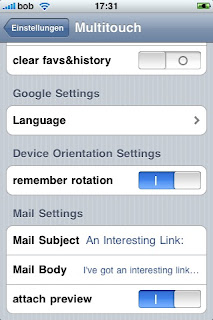
The next setting is quite handy if you like to use fgBrowser as a default widescreen browser:
- remember orientation: fgBrowser will come up in the last "frozen" (2 - finger swipe down to up gesture) even if the accelerometer says something else. Quite handy if you prefer surfing in fullscreen widescreen as many of you prefer.
(After launch a locked or unlocked sign will show you if the current orientation is locked in)
- Mail Settings:
Define you default mail text and subject, decide if you like some preview image attached to your mail.
there is a slight issue with the email text. To fix it please go to your general iPhone "Settings" scroll down to "Multitouch" and open once all the hidden settings for your fgBrowser. (Hit the Multitouch with the lock symbol for the private one) There are some handy settings ready to be set:

- scroll to top: if enabled touch the top of the screen and the current page will scroll to the top
- scroll to bottom: if enabled touch the bottom of the screen and the current page scroll all to the bottom
- right swipe to go back: if enabled a swipe left to right will navigate backwards otherwise swipe right to left to go backwards
- keep history for: automatically deletes old history entries after "x" days or never
- clear only history: delete whole history after restart
- clear favs&history: deletes all information even your favs

The next setting is quite handy if you like to use fgBrowser as a default widescreen browser:
- remember orientation: fgBrowser will come up in the last "frozen" (2 - finger swipe down to up gesture) even if the accelerometer says something else. Quite handy if you prefer surfing in fullscreen widescreen as many of you prefer.
(After launch a locked or unlocked sign will show you if the current orientation is locked in)
- Mail Settings:
Define you default mail text and subject, decide if you like some preview image attached to your mail.
Friday, March 26, 2010
Adult Content
Sometimes I get asked whats the big difference between both fgBrowser variants. So for today let us focus on the "Private fgBrowser"...
Unlike Safari and the non private fgBrowser - they automatically write a full history of your browsing habits- the "Private fgBrowser" does not....
It takes you even a big step further! It allows you to add pass-code protected bookmarks, and "freely" visible bookmarks to keep up a good charade. Quickly enter a 4 digit code to view your very own private bookmarks.
In the worst case scenario...e.g.. somebody enters the room you just have to hit the "home button" on your iPhone / iPod / iPad and it takes you back to the iPhones home screen. If you restart the private browser, it will just open your defined homepage.
Controls:
3 fingers down: this one will bring up the bookmarksection.
2 fingers swipe left/right: previous page / next page (customizable @ general settings)
2 fingers up: lock the current orientation and disable autorotation!! hey with this one and the remember orientation setting you will make fgBrowser to act like a true widescreen browser automatically after startup! Try it!
2 fingers down: some features for the current open page: mail, set homepage, add to favs, open in safari
If activated (general settings)
Hit the top of the screen to scroll to the top of the current page.
Hit the bottom of the screen to scroll to the end of the current page!
The controls between fgBrowser and Private fgBrowser are very similar! Just try it!!!
Unlike Safari and the non private fgBrowser - they automatically write a full history of your browsing habits- the "Private fgBrowser" does not....
It takes you even a big step further! It allows you to add pass-code protected bookmarks, and "freely" visible bookmarks to keep up a good charade. Quickly enter a 4 digit code to view your very own private bookmarks.
In the worst case scenario...e.g.. somebody enters the room you just have to hit the "home button" on your iPhone / iPod / iPad and it takes you back to the iPhones home screen. If you restart the private browser, it will just open your defined homepage.
Controls:
3 fingers down: this one will bring up the bookmarksection.
2 fingers swipe left/right: previous page / next page (customizable @ general settings)
2 fingers up: lock the current orientation and disable autorotation!! hey with this one and the remember orientation setting you will make fgBrowser to act like a true widescreen browser automatically after startup! Try it!
2 fingers down: some features for the current open page: mail, set homepage, add to favs, open in safari
If activated (general settings)
Hit the top of the screen to scroll to the top of the current page.
Hit the bottom of the screen to scroll to the end of the current page!
The controls between fgBrowser and Private fgBrowser are very similar! Just try it!!!
Friday, June 26, 2009
fgBrowser 2.6 released - private version still pending
Hi there!
I'm very happy to announce: fgBrowser 2.6 is finally released!
1.) Launch Mobile Safari (on your iPhone)
I dedicate this release to the one and only MICHAEL JACKSON!
But the Private fgBrowser 2.6 update is still in review und should be available soon! It features also the "touch loading indicator icon to STOP loading" and some iPhone 3.0 improvements. Currently if you are using 2.5 on a prior 3.0 device everything will work fine. With 3.0 AND the PRIVATE version you will encounter problems following some links. This issue is already fixed in 2.6.
I'm currently emailing with apple about the AutoFill feature. Hope fgBrowser will soon utilize this one.
So long, hope you like the new icon design,
I'm very happy to announce: fgBrowser 2.6 is finally released!
[INFO Compatibility]
Some users reported a glitch with formular data. After filling one field, the browser gets unresponsive to links or other formular data. This is a compatibility issue with the 3.0 iPhone OS It's a bug which should be addressed by Apple with an 3.0.1 update.[/INFO]
Instructions how to setup your private fgBrowser 2.6 bookmarklet:
manually install:
2.) Surf to "google.com" and make a new bookmark of google.com
3.) Go to your bookmarks, touch "edit" and touch on your newly created google.com bookmark
4.) This will bring up the edit screen. Put there "private multitouch" as a title (this text is up to you)
5.) The very important part:
In the URL field type in exactly the next bold line
javascript:window.location='fgBrowser:///open?'+escape(window.location)
6) After that you may return to the bookmark screen
7) From now on, if you like to send an safari bookmark to fgBrowser, just surf to the site with safari, bring up the bookmark screen, and tap on "private multitouch"
8) This will close safari and brings up multitouch - fgBrowser. If everything went OK you should see a short flashing "+ bookmark added" sign
I dedicate this release to the one and only MICHAEL JACKSON!
But the Private fgBrowser 2.6 update is still in review und should be available soon! It features also the "touch loading indicator icon to STOP loading" and some iPhone 3.0 improvements. Currently if you are using 2.5 on a prior 3.0 device everything will work fine. With 3.0 AND the PRIVATE version you will encounter problems following some links. This issue is already fixed in 2.6.
I'm currently emailing with apple about the AutoFill feature. Hope fgBrowser will soon utilize this one.
So long, hope you like the new icon design,
best regards,
matthias
Tuesday, April 7, 2009
fgBrowser - multitouch fullscreen webbrowser

It features a very fast user interface supported by several multitouch gestures.
Unlike other fullscreen browsers you DO NOT HAVE TO SHAKE your iPhone! (this is very convenient especially at public places or in bed beside your partner)
ON SALE!!
The whole user interface is optimized for a very fast and convenient browsing experience. It got innovative bookmark and history screens. The built in google search uses the mobile google search, unlike the safari which fires the desktop google site up.
USER OPINIONS
"I tested all of the fullscreen browser, and I thought this one was the best. Simple Interface, fast operation, and responsive developer. I'm sticking with this one.""Truly a groundbreaking browser! Great features""This has everything I've been looking for in a fullscreen browser! TRULY FULLSCREEN!! No stupid icon to click on to bring up the URL field. Very intuitive gesture commands, Accelerometer disable option!"
Thank you guys!
FEATURES
- saving pictures -> double tap on the image to zoom in and press "sleep/wake button" and home button together. You will see a short white flashing of the screen, and your image will be saved under the camera roll - snappier fullscreen browsing
- built in gestures
- 3 finger down: open up the URL, bookmark, history, Google screen
- 2 finger swipe left: history back (session history)
- 2 finger swipe right: history forward (session history)
- 2 finger swipe up: un/lock in the current orientation and enable/disable autorotation
- 2 finger swipe down: bring up a menu with:
-> add/remove bookmark, email this page, open in safari, reload
- scroll to top / bottom -> just tap on the top or the bottom of your screen
- force language of google search
- option to use as permanent landscape browser (just customize under the general settings)
- easy to view history, ordered by last visit date
- easy to view history, ordered by hit count
- easy to view bookmarks, ordered by hit count
- loading indicator in the lower right corner
- all entries EDITABLE
- all entries with that cute little FAVICONS (little icons most website have)
- built in "Mobile Google" search
- opens automatically your last site after reopening
- statusbar visible in bookmark view (for time, battery info, network status)
- memory saving browser, perfect companion for gaming
- Setting Pane (look under general settings, and below)
INSTRUCTIONS:
Touch with 3 fingers anywhere at the screen to open the bookmark screen. There you may enter a url, start a google search. Or just tap on a site your favorite site. There is no need to add a bookmark manually. Every page you surf to, shows automatically up.
For every visit the bookmark gets a higher rank in the "Hit Count" view.
You may view your visited pages historically by visit date. So you use the "Date" view. I've you like certain websites you may add it to your "Favs" view either by using the "2-finger-swipe-down" gesture or you switch in the "Edit" mode and just tap on each page you like. Fav-pages are shown bold in every view.
The date under the page title shows your very last visit date of the particular page.
CUSTOMIZE
you may enable the scroll to top / bottom feature, set a custom google search language, or enable / disable "remember last orientation" --> this feature allows you to use fgBrowser as a landscape browser. As it remembers your last orientation and autorotation state.
A short flashing lock / unlock icon informs you about the current setting (with the remember last orientation feature ON)

Subscribe to:
Posts (Atom)