I'm sorry to announce...
There are two big issues with the current selling fgBrowser versions.
First fgBrowser Private for the iPad... It crashes immediately. I submitted a new iPad release for Approval, please bare with me.
Second, any fgBrowser version for the new iPhone 4. The status indicator seems there to uses another implementation. See here [stackoverflow] for more details.
I've done a quick workaround to fix the usability, but in respect to look and feel, I'm not happy with my solution. I hope Apple will fix the UIActivityIndicatorView in there "Signaling update".
So again "stay tuned"...
Tuesday, June 29, 2010

Monday, June 21, 2010
iOS4 Release
Thursday, May 13, 2010
User interface - 3 finger down
Hey every new fgBrowser,
to access the favs and history, lay down 3 fingertips onto the screen...
Other gestures:
2 fingers parallel....
... bottom to top: lock or unlock screen autorotation (accelerometer)
... top to bottom: access a website based subcontent menu
- email this page (with preview image attached)
- add / remove to / from favs
- open in safari
- reload
... left to right or vice versa: navigate through current history (ie like clicking on the back and forth button in safari)
To save an image to the camera roll, just align the picture so it's fits your screen and press the "sleep/wake" and "home" button of your iPhone simultaneously. You will see a short flash and it will be saved in your camera roll...
Best greets,
Matthias
to access the favs and history, lay down 3 fingertips onto the screen...
Other gestures:
2 fingers parallel....
... bottom to top: lock or unlock screen autorotation (accelerometer)
... top to bottom: access a website based subcontent menu
- email this page (with preview image attached)
- add / remove to / from favs
- open in safari
- reload
... left to right or vice versa: navigate through current history (ie like clicking on the back and forth button in safari)
To save an image to the camera roll, just align the picture so it's fits your screen and press the "sleep/wake" and "home" button of your iPhone simultaneously. You will see a short flash and it will be saved in your camera roll...
Best greets,
Matthias
Friday, May 7, 2010
send link as email with preview image
Hey there trusty fgBrowsers,
there is a slight issue with the email text. To fix it please go to your general iPhone "Settings" scroll down to "Multitouch" and open once all the hidden settings for your fgBrowser. (Hit the Multitouch with the lock symbol for the private one) There are some handy settings ready to be set:
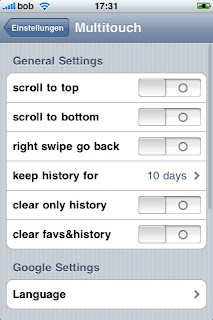
- scroll to top: if enabled touch the top of the screen and the current page will scroll to the top
- scroll to bottom: if enabled touch the bottom of the screen and the current page scroll all to the bottom
- right swipe to go back: if enabled a swipe left to right will navigate backwards otherwise swipe right to left to go backwards
- keep history for: automatically deletes old history entries after "x" days or never
- clear only history: delete whole history after restart
- clear favs&history: deletes all information even your favs
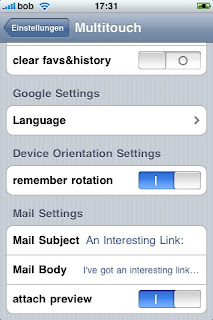
The next setting is quite handy if you like to use fgBrowser as a default widescreen browser:
- remember orientation: fgBrowser will come up in the last "frozen" (2 - finger swipe down to up gesture) even if the accelerometer says something else. Quite handy if you prefer surfing in fullscreen widescreen as many of you prefer.
(After launch a locked or unlocked sign will show you if the current orientation is locked in)
- Mail Settings:
Define you default mail text and subject, decide if you like some preview image attached to your mail.
there is a slight issue with the email text. To fix it please go to your general iPhone "Settings" scroll down to "Multitouch" and open once all the hidden settings for your fgBrowser. (Hit the Multitouch with the lock symbol for the private one) There are some handy settings ready to be set:

- scroll to top: if enabled touch the top of the screen and the current page will scroll to the top
- scroll to bottom: if enabled touch the bottom of the screen and the current page scroll all to the bottom
- right swipe to go back: if enabled a swipe left to right will navigate backwards otherwise swipe right to left to go backwards
- keep history for: automatically deletes old history entries after "x" days or never
- clear only history: delete whole history after restart
- clear favs&history: deletes all information even your favs

The next setting is quite handy if you like to use fgBrowser as a default widescreen browser:
- remember orientation: fgBrowser will come up in the last "frozen" (2 - finger swipe down to up gesture) even if the accelerometer says something else. Quite handy if you prefer surfing in fullscreen widescreen as many of you prefer.
(After launch a locked or unlocked sign will show you if the current orientation is locked in)
- Mail Settings:
Define you default mail text and subject, decide if you like some preview image attached to your mail.
Friday, March 26, 2010
Adult Content
Sometimes I get asked whats the big difference between both fgBrowser variants. So for today let us focus on the "Private fgBrowser"...
Unlike Safari and the non private fgBrowser - they automatically write a full history of your browsing habits- the "Private fgBrowser" does not....
It takes you even a big step further! It allows you to add pass-code protected bookmarks, and "freely" visible bookmarks to keep up a good charade. Quickly enter a 4 digit code to view your very own private bookmarks.
In the worst case scenario...e.g.. somebody enters the room you just have to hit the "home button" on your iPhone / iPod / iPad and it takes you back to the iPhones home screen. If you restart the private browser, it will just open your defined homepage.
Controls:
3 fingers down: this one will bring up the bookmarksection.
2 fingers swipe left/right: previous page / next page (customizable @ general settings)
2 fingers up: lock the current orientation and disable autorotation!! hey with this one and the remember orientation setting you will make fgBrowser to act like a true widescreen browser automatically after startup! Try it!
2 fingers down: some features for the current open page: mail, set homepage, add to favs, open in safari
If activated (general settings)
Hit the top of the screen to scroll to the top of the current page.
Hit the bottom of the screen to scroll to the end of the current page!
The controls between fgBrowser and Private fgBrowser are very similar! Just try it!!!
Unlike Safari and the non private fgBrowser - they automatically write a full history of your browsing habits- the "Private fgBrowser" does not....
It takes you even a big step further! It allows you to add pass-code protected bookmarks, and "freely" visible bookmarks to keep up a good charade. Quickly enter a 4 digit code to view your very own private bookmarks.
In the worst case scenario...e.g.. somebody enters the room you just have to hit the "home button" on your iPhone / iPod / iPad and it takes you back to the iPhones home screen. If you restart the private browser, it will just open your defined homepage.
Controls:
3 fingers down: this one will bring up the bookmarksection.
2 fingers swipe left/right: previous page / next page (customizable @ general settings)
2 fingers up: lock the current orientation and disable autorotation!! hey with this one and the remember orientation setting you will make fgBrowser to act like a true widescreen browser automatically after startup! Try it!
2 fingers down: some features for the current open page: mail, set homepage, add to favs, open in safari
If activated (general settings)
Hit the top of the screen to scroll to the top of the current page.
Hit the bottom of the screen to scroll to the end of the current page!
The controls between fgBrowser and Private fgBrowser are very similar! Just try it!!!
Wednesday, March 17, 2010
Happy Saint Patrick's Day 2010
Dia Dhuit Dia Dhuit!
fgBrowser gets a minor update to 3.1.1 because of a bug with the javascript subsystem. And our lovely private version got updated to 3.0 with a fixed google search!
So again I wish you grateful Saint Patrick's Day! And stay tuned for Guiness and fgBrowser!
Slainte and Guid forder!
fgBrowser gets a minor update to 3.1.1 because of a bug with the javascript subsystem. And our lovely private version got updated to 3.0 with a fixed google search!
So again I wish you grateful Saint Patrick's Day! And stay tuned for Guiness and fgBrowser!
Slainte and Guid forder!
Saturday, March 6, 2010
long time no see
Hey there trusty fgBrowsers,
I had a very very arduous time the last half year. But as I got so many mails asking for an update... I couldn't resist. I've submitted an update to Apple:
- fixed google search (it was really time!)
- the "favs" tab bookmarks are now sortable
- email subject and body customizable via general preferences
- some bugfixes and improvements.
I'm still working on some new extra features.... I got many ideas and suggestions via email and I just wanna say: Thank you!
Take care,
Matthias
I had a very very arduous time the last half year. But as I got so many mails asking for an update... I couldn't resist. I've submitted an update to Apple:
- fixed google search (it was really time!)
- the "favs" tab bookmarks are now sortable
- email subject and body customizable via general preferences
- some bugfixes and improvements.
I'm still working on some new extra features.... I got many ideas and suggestions via email and I just wanna say: Thank you!
Take care,
Matthias
Subscribe to:
Posts (Atom)