Hey there!
2013 will change everything, again. So does the URL of my blog:
matthiasgasser.net
See you there!
Sunday, December 2, 2012

Thursday, October 6, 2011
Steve Jobs has passed away
Apple's website announces the sad news that Apple co-founder and former CEO Steve Jobs has passed away. Jobs was 56 years old, and had been struggling with complications related to pancreatic cancer over the past several years. Apple leaves the following message on their website in tribute to Jobs:
Apple has released this statement:
Thats really sad news.
Nothing left to say right now just:
RIP
Apple has lost a visionary and creative genius, and the world has lost an amazing human being. Those of us who have been fortunate enough to know and work with Steve have lost a dear friend and an inspiring mentor. Steve leaves behind a company that only he could have built, and his spirit will forever be the foundation of Apple.
If you would like to share your thoughts, memories and condolences, please email rememberingsteve@apple.com
Apple has released this statement:
We are deeply saddened to announce that Steve Jobs passed away today.
Steve’s brilliance, passion and energy were the source of countless innovations that
enrich and improve all of our lives. The world is immeasurably better because of Steve.
His greatest love was for his wife, Laurene, and his family. Our hearts go out to them and to all who were touched by his extraordinary gifts.
Thats really sad news.
Nothing left to say right now just:
RIP
Friday, April 1, 2011
+++ BREAKING NEWS +++ Apple acquired fgBrowsers "Fingatures" for iOS5
Today Apple development representative called and offered me to acquire fgBrowsers unique One Finger Gestures to implement them into Safari for iOS5!
Thanks and keep fgBrowsing everybody =)
Matthias
Thanks and keep fgBrowsing everybody =)
Matthias
Thursday, March 17, 2011
iTunes Review of fgBrowser
Hello dear trusty fgBrowsers,
Today I read an interesting review at the US iTunes Store:

I don't know how the reviewer comes to this conclusion, as the "normal" app is not sold as an universal app. So it's just not made for the iPad.
However there is an universal build of the private version, however by the lack of time not the same feature rich version as the regular fgBrowser, but it still does it's purpose very well providing an easy possibility to be fullscreen gesture based on the iPad.
Still there are plenty features / ideas in the pipe to get a fast uncomplicated browsing experience in real fullscreen.
Stay tuned :)
Today I read an interesting review at the US iTunes Store:

I don't know how the reviewer comes to this conclusion, as the "normal" app is not sold as an universal app. So it's just not made for the iPad.
However there is an universal build of the private version, however by the lack of time not the same feature rich version as the regular fgBrowser, but it still does it's purpose very well providing an easy possibility to be fullscreen gesture based on the iPad.
Still there are plenty features / ideas in the pipe to get a fast uncomplicated browsing experience in real fullscreen.
Stay tuned :)
Sunday, January 2, 2011
Happy New Year!
Wishing you a happy and healthy New Year!
fgBrowser will have some other cool features this year, like folders and a all new tab solution that not sucks like Safari's do.
A youtube vid for one finger gestures is in the works! Stay tuned! In the meantime remember the gesture guide :)

fgBrowser will have some other cool features this year, like folders and a all new tab solution that not sucks like Safari's do.
A youtube vid for one finger gestures is in the works! Stay tuned! In the meantime remember the gesture guide :)
Friday, December 17, 2010
Mobile websites issue!
The update introduced a misbehavior with some mobile sites... Sites like macrumors use some sort of forwarding to their mobile forum.. fgbrowser misintreprets those links as AppStore candidates and forwards the link to iOS, however it's of course only meaningfull regarding an AppStore app link. ( to bring up the AppStore )
I've already submitted a fix to Apple hope it's getting approved soon!
Seems like the version 4.2 has always some sort of shortcoming... iOS also hat a very short life on 4.2 and skipped somehow immediately to 4.2.1...
Again I'm sorry for any inconvenience caused!
I've already submitted a fix to Apple hope it's getting approved soon!
Seems like the version 4.2 has always some sort of shortcoming... iOS also hat a very short life on 4.2 and skipped somehow immediately to 4.2.1...
Again I'm sorry for any inconvenience caused!
Thanks @ JN Gold for pointing this one out! (see for reference)
Monday, December 13, 2010
Big X-MAS Update!
Happy X-Mas trusty fgBrowsers!
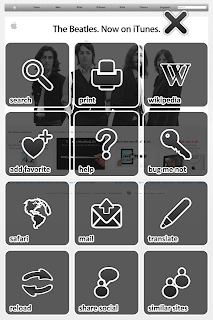
Multitouch fgBrowser made a big leap forward, introducing:
* configurable @ general settings! Needs full app restart (I.e. multitasking close of app)
** set language @ general settings!

Don't wait get it now!
Merry X-Mas everyone!
Multitouch fgBrowser made a big leap forward, introducing:
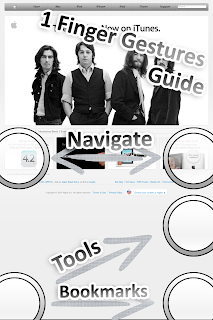
- one hand operation featuring one finger gestures
- social network integration (Facebook,Twitter, Tumblr, Delicious, Google Reader, Instapaper, Read It Later, Pinboard)
- Bug me not integration
- Wikipedia integration
- Search in Site
- Translate Site**
- Find similar Sites
- Gesture Helper to train gestures
- Print Page
- Change User Agent! Pretend to be an Internet Explorer, or fake an Android or Nokia Mobile! *
* configurable @ general settings! Needs full app restart (I.e. multitasking close of app)
** set language @ general settings!


Don't wait get it now!
Merry X-Mas everyone!
Thursday, November 25, 2010
Saturday, November 20, 2010
New Stuff
Hey there trusty fgBrowsers!!!
There are some cool new features in the work, which will be available shortly after the release of iOS 4.2.1! However I'm still thinking and tweaking the iPad version of fgBrowser.
More breaking news will follow!
Take care,
Matthias!
There are some cool new features in the work, which will be available shortly after the release of iOS 4.2.1! However I'm still thinking and tweaking the iPad version of fgBrowser.
More breaking news will follow!
Take care,
Matthias!
Wednesday, July 7, 2010
3 Tap Gesture
Hey there,
just read a comment @ US iTunes Store:
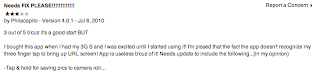
I'm sorry I can't reproduce this issue. You don't have to put all 3 fingers at the very same time down the screen. It's quite sufficient to put them one after another.
Please report me if the issue persist, or more people are affected.
Thank you!
just read a comment @ US iTunes Store:

I'm sorry I can't reproduce this issue. You don't have to put all 3 fingers at the very same time down the screen. It's quite sufficient to put them one after another.
Please report me if the issue persist, or more people are affected.
Thank you!
Tuesday, July 6, 2010
Update!!!
Hey there trusty fgBrowsers!!! I'm happy to announce, the private version of Multitouch is now a universal app for the iPhone and iPad!
Also coming with "High Res" Artwork for the iPhone4!!!!
The normal version is also updated with "High Res" and now available on the AppStore.
The visibility of the loading indicator is know improved (due a bug of the iPhone 4)
cya soon!
Also coming with "High Res" Artwork for the iPhone4!!!!
The normal version is also updated with "High Res" and now available on the AppStore.
The visibility of the loading indicator is know improved (due a bug of the iPhone 4)
cya soon!
Tuesday, June 29, 2010
iPad Issue; iPhone 4 Issue
I'm sorry to announce...
There are two big issues with the current selling fgBrowser versions.
First fgBrowser Private for the iPad... It crashes immediately. I submitted a new iPad release for Approval, please bare with me.
Second, any fgBrowser version for the new iPhone 4. The status indicator seems there to uses another implementation. See here [stackoverflow] for more details.
I've done a quick workaround to fix the usability, but in respect to look and feel, I'm not happy with my solution. I hope Apple will fix the UIActivityIndicatorView in there "Signaling update".
So again "stay tuned"...
There are two big issues with the current selling fgBrowser versions.
First fgBrowser Private for the iPad... It crashes immediately. I submitted a new iPad release for Approval, please bare with me.
Second, any fgBrowser version for the new iPhone 4. The status indicator seems there to uses another implementation. See here [stackoverflow] for more details.
I've done a quick workaround to fix the usability, but in respect to look and feel, I'm not happy with my solution. I hope Apple will fix the UIActivityIndicatorView in there "Signaling update".
So again "stay tuned"...
Monday, June 21, 2010
iOS4 Release
Thursday, May 13, 2010
User interface - 3 finger down
Hey every new fgBrowser,
to access the favs and history, lay down 3 fingertips onto the screen...
Other gestures:
2 fingers parallel....
... bottom to top: lock or unlock screen autorotation (accelerometer)
... top to bottom: access a website based subcontent menu
- email this page (with preview image attached)
- add / remove to / from favs
- open in safari
- reload
... left to right or vice versa: navigate through current history (ie like clicking on the back and forth button in safari)
To save an image to the camera roll, just align the picture so it's fits your screen and press the "sleep/wake" and "home" button of your iPhone simultaneously. You will see a short flash and it will be saved in your camera roll...
Best greets,
Matthias
to access the favs and history, lay down 3 fingertips onto the screen...
Other gestures:
2 fingers parallel....
... bottom to top: lock or unlock screen autorotation (accelerometer)
... top to bottom: access a website based subcontent menu
- email this page (with preview image attached)
- add / remove to / from favs
- open in safari
- reload
... left to right or vice versa: navigate through current history (ie like clicking on the back and forth button in safari)
To save an image to the camera roll, just align the picture so it's fits your screen and press the "sleep/wake" and "home" button of your iPhone simultaneously. You will see a short flash and it will be saved in your camera roll...
Best greets,
Matthias
Friday, May 7, 2010
send link as email with preview image
Hey there trusty fgBrowsers,
there is a slight issue with the email text. To fix it please go to your general iPhone "Settings" scroll down to "Multitouch" and open once all the hidden settings for your fgBrowser. (Hit the Multitouch with the lock symbol for the private one) There are some handy settings ready to be set:
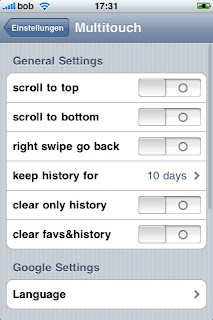
- scroll to top: if enabled touch the top of the screen and the current page will scroll to the top
- scroll to bottom: if enabled touch the bottom of the screen and the current page scroll all to the bottom
- right swipe to go back: if enabled a swipe left to right will navigate backwards otherwise swipe right to left to go backwards
- keep history for: automatically deletes old history entries after "x" days or never
- clear only history: delete whole history after restart
- clear favs&history: deletes all information even your favs
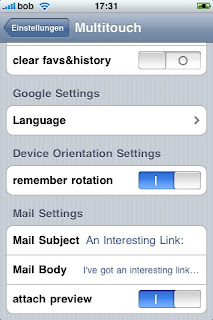
The next setting is quite handy if you like to use fgBrowser as a default widescreen browser:
- remember orientation: fgBrowser will come up in the last "frozen" (2 - finger swipe down to up gesture) even if the accelerometer says something else. Quite handy if you prefer surfing in fullscreen widescreen as many of you prefer.
(After launch a locked or unlocked sign will show you if the current orientation is locked in)
- Mail Settings:
Define you default mail text and subject, decide if you like some preview image attached to your mail.
there is a slight issue with the email text. To fix it please go to your general iPhone "Settings" scroll down to "Multitouch" and open once all the hidden settings for your fgBrowser. (Hit the Multitouch with the lock symbol for the private one) There are some handy settings ready to be set:

- scroll to top: if enabled touch the top of the screen and the current page will scroll to the top
- scroll to bottom: if enabled touch the bottom of the screen and the current page scroll all to the bottom
- right swipe to go back: if enabled a swipe left to right will navigate backwards otherwise swipe right to left to go backwards
- keep history for: automatically deletes old history entries after "x" days or never
- clear only history: delete whole history after restart
- clear favs&history: deletes all information even your favs

The next setting is quite handy if you like to use fgBrowser as a default widescreen browser:
- remember orientation: fgBrowser will come up in the last "frozen" (2 - finger swipe down to up gesture) even if the accelerometer says something else. Quite handy if you prefer surfing in fullscreen widescreen as many of you prefer.
(After launch a locked or unlocked sign will show you if the current orientation is locked in)
- Mail Settings:
Define you default mail text and subject, decide if you like some preview image attached to your mail.
Friday, March 26, 2010
Adult Content
Sometimes I get asked whats the big difference between both fgBrowser variants. So for today let us focus on the "Private fgBrowser"...
Unlike Safari and the non private fgBrowser - they automatically write a full history of your browsing habits- the "Private fgBrowser" does not....
It takes you even a big step further! It allows you to add pass-code protected bookmarks, and "freely" visible bookmarks to keep up a good charade. Quickly enter a 4 digit code to view your very own private bookmarks.
In the worst case scenario...e.g.. somebody enters the room you just have to hit the "home button" on your iPhone / iPod / iPad and it takes you back to the iPhones home screen. If you restart the private browser, it will just open your defined homepage.
Controls:
3 fingers down: this one will bring up the bookmarksection.
2 fingers swipe left/right: previous page / next page (customizable @ general settings)
2 fingers up: lock the current orientation and disable autorotation!! hey with this one and the remember orientation setting you will make fgBrowser to act like a true widescreen browser automatically after startup! Try it!
2 fingers down: some features for the current open page: mail, set homepage, add to favs, open in safari
If activated (general settings)
Hit the top of the screen to scroll to the top of the current page.
Hit the bottom of the screen to scroll to the end of the current page!
The controls between fgBrowser and Private fgBrowser are very similar! Just try it!!!
Unlike Safari and the non private fgBrowser - they automatically write a full history of your browsing habits- the "Private fgBrowser" does not....
It takes you even a big step further! It allows you to add pass-code protected bookmarks, and "freely" visible bookmarks to keep up a good charade. Quickly enter a 4 digit code to view your very own private bookmarks.
In the worst case scenario...e.g.. somebody enters the room you just have to hit the "home button" on your iPhone / iPod / iPad and it takes you back to the iPhones home screen. If you restart the private browser, it will just open your defined homepage.
Controls:
3 fingers down: this one will bring up the bookmarksection.
2 fingers swipe left/right: previous page / next page (customizable @ general settings)
2 fingers up: lock the current orientation and disable autorotation!! hey with this one and the remember orientation setting you will make fgBrowser to act like a true widescreen browser automatically after startup! Try it!
2 fingers down: some features for the current open page: mail, set homepage, add to favs, open in safari
If activated (general settings)
Hit the top of the screen to scroll to the top of the current page.
Hit the bottom of the screen to scroll to the end of the current page!
The controls between fgBrowser and Private fgBrowser are very similar! Just try it!!!
Wednesday, March 17, 2010
Happy Saint Patrick's Day 2010
Dia Dhuit Dia Dhuit!
fgBrowser gets a minor update to 3.1.1 because of a bug with the javascript subsystem. And our lovely private version got updated to 3.0 with a fixed google search!
So again I wish you grateful Saint Patrick's Day! And stay tuned for Guiness and fgBrowser!
Slainte and Guid forder!
fgBrowser gets a minor update to 3.1.1 because of a bug with the javascript subsystem. And our lovely private version got updated to 3.0 with a fixed google search!
So again I wish you grateful Saint Patrick's Day! And stay tuned for Guiness and fgBrowser!
Slainte and Guid forder!
Saturday, March 6, 2010
long time no see
Hey there trusty fgBrowsers,
I had a very very arduous time the last half year. But as I got so many mails asking for an update... I couldn't resist. I've submitted an update to Apple:
- fixed google search (it was really time!)
- the "favs" tab bookmarks are now sortable
- email subject and body customizable via general preferences
- some bugfixes and improvements.
I'm still working on some new extra features.... I got many ideas and suggestions via email and I just wanna say: Thank you!
Take care,
Matthias
I had a very very arduous time the last half year. But as I got so many mails asking for an update... I couldn't resist. I've submitted an update to Apple:
- fixed google search (it was really time!)
- the "favs" tab bookmarks are now sortable
- email subject and body customizable via general preferences
- some bugfixes and improvements.
I'm still working on some new extra features.... I got many ideas and suggestions via email and I just wanna say: Thank you!
Take care,
Matthias
Wednesday, September 16, 2009
I'm back!
Hey there again fgBrowsers!
I'm finally back from my trip trough Asia and I'm going to improve your fgBrowser experience again....
If there is any question, suggestion about fgBrowser... just let me know!
I'm finally back from my trip trough Asia and I'm going to improve your fgBrowser experience again....
If there is any question, suggestion about fgBrowser... just let me know!
Thursday, July 30, 2009
Google Search issues
Hello fgBrowsers!
It seems google had changed the way how a quicksearch works. As the rendering engine is based on webkit you may encounter problems using google by the quick search bar. As I'm currently abroad, I'm will not be able to fix this issue until I'm going to return home at the and of august.
In the meantime you may use the following link for your search needs:
http://www.google.com/m/search?home=mig&gl=us&source=mig&hl=de&q=
sorry for any inconvenience caused and I wish everyone a nice summertime!
Best greets from Manila!
It seems google had changed the way how a quicksearch works. As the rendering engine is based on webkit you may encounter problems using google by the quick search bar. As I'm currently abroad, I'm will not be able to fix this issue until I'm going to return home at the and of august.
In the meantime you may use the following link for your search needs:
http://www.google.com/m/search?home=mig&gl=us&source=mig&hl=de&q=
sorry for any inconvenience caused and I wish everyone a nice summertime!
Best greets from Manila!
Subscribe to:
Posts (Atom)